
BigConsole: Multi-Line Console for Chrome Dev Tools
Overview
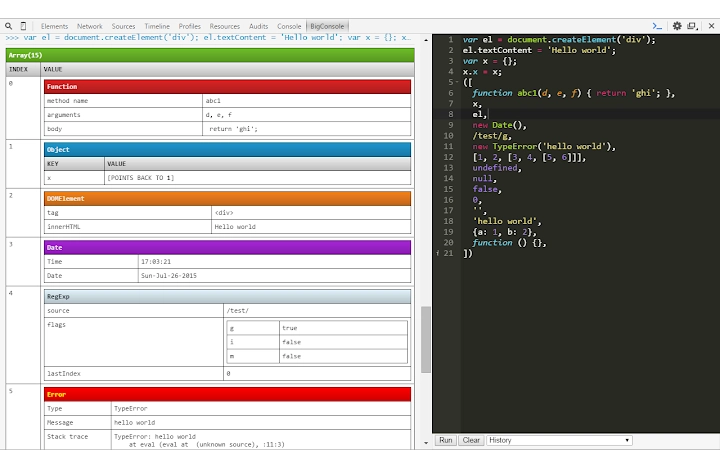
BigConsole enhances the Chrome Developer Tools by introducing a multi-line split console interface inspired by Firebug. Designed for developers who frequently test and iterate on JavaScript, HTML, and CSS code, it streamlines the process of executing and refining snippets directly within the browser’s development environment. The tool addresses the limitations of Chrome’s built-in Snippets editor, which, while functional, lacks robust multiline editing and real-time feedback for iterative coding. BigConsole fills this gap with a dedicated REPL (Read-Eval-Print Loop) interface that supports syntax highlighting, code history, and immediate execution via keyboard shortcuts or a dedicated button.
Target users include front-end developers, web testers, and debugging specialists who rely on rapid code experimentation. The tool is especially useful for prototyping small functions, testing DOM manipulations, or debugging complex logic without switching between external editors. Its lightweight nature and open-source foundation make it accessible to both individual developers and teams seeking a streamlined debugging workflow. The software is not a standalone application but a Chrome extension, meaning it integrates directly into the browser’s developer ecosystem.
Key Features & Capabilities
- Vertical Split Multiline REPL – Provides a dedicated, resizable console panel within Chrome Dev Tools, enabling users to write and execute multi-line code without the constraints of single-line input.
- Syntax Highlighting with Ace Editor – Leverages the Ace Editor library to deliver real-time syntax highlighting for JavaScript, HTML, and CSS, improving code readability and reducing errors.
- Pretty-Printed Output – Displays execution results in a structured, formatted manner, making it easier to parse complex objects, arrays, and nested data.
- Quick Execution via Keyboard or Button – Supports both a visible “Run” button and the CTRL+Enter shortcut for rapid code execution, enhancing workflow efficiency.
- Clear and History Features – Includes a “Clear” button to reset the console and a “History” dropdown to recall and reuse previously executed code snippets.
These features are particularly beneficial during debugging sessions where developers need to test multiple variations of a function or validate DOM changes in real time. The history function reduces repetitive typing, while the structured output improves the clarity of results. The integration with Chrome Dev Tools ensures no context switching, keeping the development process seamless.
User Interface, Workflow & Performance
The interface of BigConsole is minimal and tightly integrated into the Chrome Developer Tools panel. It appears as a dedicated tab or section within the Dev Tools window, maintaining the familiar layout and navigation style of Chrome’s debugging environment. The editor area is vertically split from the output panel, allowing simultaneous view of code and results. Navigation remains consistent with standard Dev Tools workflows, requiring no additional learning curve.
Workflow efficiency is enhanced by keyboard shortcuts and the ability to preserve execution history. Users can write, execute, and refine code in a single context, minimizing disruptions. The tool does not introduce significant latency or memory overhead, as it operates within the browser’s existing development framework. However, exact performance details were not specified by the developer. Resource usage behavior is expected to remain low, given the extension’s small size and reliance on established libraries.
Compatibility & System Requirements
BigConsole is compatible with Windows, Mac, and Linux operating systems, ensuring broad accessibility across development environments. It is designed exclusively as a Chrome extension, meaning it runs within the Google Chrome browser. The installation size is 1.2 MB, indicating a lightweight footprint. The software version is 1.0.0, released on March 15, 2024.
Exact system requirements were not listed by the developer. Compatibility with specific Chrome versions is not specified. However, given its nature as a Dev Tools extension, it is likely compatible with current and recent Chrome releases. The extension does not require administrative privileges or additional runtime dependencies beyond the Chrome browser.
Pros and Cons
Pros
- Enhances Chrome Dev Tools with a full-featured multiline console
- Intuitive interface with familiar Dev Tools navigation
- Supports syntax highlighting and pretty-printed output
- Keyboard shortcuts improve execution speed
- Open-source and free to use with community contributions welcome
Cons
- Requires Chrome browser and Dev Tools access
- No standalone desktop application available
- Limited to web development workflows (JavaScript, HTML, CSS)
- History and state are not persisted across sessions
- Developer did not provide detailed system requirements
FAQ Section
Is BigConsole compatible with all versions of Chrome?
The developer did not specify compatibility with particular Chrome versions. It is expected to work with current and recent Chrome releases, given its integration with Dev Tools.
Is BigConsole safe to install?
Yes, BigConsole is an open-source extension available on GitHub. It runs within Chrome’s sandboxed environment, limiting access to sensitive data. Users are advised to review the source code if security is a concern.
Can I use BigConsole offline?
Yes, once installed, BigConsole functions within the browser’s Dev Tools without requiring an internet connection. It operates locally using the browser’s built-in tools.
Does BigConsole support other programming languages?
Based on the available information, BigConsole is focused on JavaScript, HTML, and CSS. It does not support other languages beyond the web stack.
How do I update BigConsole?
Updates are managed automatically through the Chrome Web Store. Users will receive notifications when a new version is available.
Final Thoughts
BigConsole delivers a focused, efficient enhancement to Chrome’s Developer Tools, specifically tailored for developers who value speed and clarity in code iteration. Its clean interface, syntax-aware editing, and history functionality make it a valuable addition for anyone working with web technologies. While it lacks some advanced IDE features, it excels in its core purpose: enabling rapid, multiline code execution within the browser.
For front-end developers, debugging specialists, and web testers, this tool streamlines the process of testing and refining code without leaving the browser. Its open-source nature and lightweight design further strengthen its appeal. With no cost and a simple installation process, it’s an accessible upgrade to the standard Dev Tools experience.
Download BigConsole now







